# Lab 9: CI/CD with GitHub Actions
# Interlude
Welcome back to this amazing series of "Becoming DevOps: Zero to Hero". Now that you have learnt so many tools for developing efficiently, we change our gear and ask how would we ensure the quality of our code?
But... What is "quality of code" means?
Well, if we did some research on Google, we would end ups with many ideas.
- Readability
- Extensibility
- Reusability
- Portability
- Maintainability
- Testability
- Reliability
and many many many more ...ability
Whoaaaaa!! That is so many and too many to consider. That is ok because there is no definitive of how to really measure those ...ability .... yet. Maybe, in the next year, one of you will develop Deep Learning Base Code Analyzer to objectively measure the quality.
The basic mind set of "good code" is "maintainability".
DevOps tech: Code maintainability - cloud.google.com (opens new window)
The 2019 State of DevOps Report from DevOps Research and Assessment (DORA) research shows that the ability of teams to maintain their code effectively is one of a number of technical practices that contribute positively to success with continuous delivery (opens new window). If your team is doing a good job with code maintainability, the following are true:
- It's easy for the team to find examples in the codebase, reuse other people's code, and change code maintained by other teams if necessary.
- It's easy for the team to add new dependencies to their project, and to migrate to a new version of a dependency.
- The team's dependencies are stable and rarely break the code.
These findings highlight the importance of making it easy for developers to find, reuse, and change code across the whole organization's codebase, and also of implementing practices and tools to help with dependency management.
Code maintainability is a capability that requires organization-wide coordination, since it relies on being able to search, reuse, and change other teams' code. Managing dependencies effectively is often a major source of pain when working with large codebases and large organizations. Tooling that can help avoid problems with dependencies or illuminate the consequences of code changes can improve design decisions and code quality for all engineers, which in turn enables them to work faster and create more stable, reliable software.
From what we read, the issue is clearly shown when the project consists of multiple teams/devs and huge code base.
It is essential to adopt and evolve processes and tooling that make it easy for teams to consume known-good versions of dependencies and upgrade them rapidly, including automated continuous integration (CI) (opens new window) and testing (opens new window) to discover if new versions of dependencies contain breaking changes), and to quickly and simply correlate the versions of dependencies in use with the systems that use them.
# Continuous Integration (CI)
Continuous Integration (original version) - https://martinfowler.com/ (opens new window)
The fundamental benefit of continuous integration is that it removes sessions where people spend time hunting bugs where one person's work has stepped on someone else's work without either person realizing what happened. These bugs are hard to find because the problem isn't in one person's area, it is in the interaction between two pieces of work. This problem is exacerbated by time. Often integration bugs can be inserted weeks or months before they first manifest themselves. As a result they take a lot of finding.
A code that has a bug will not cause an issue until it is. If your code has a = b/c, it will be fine until c is 0. If c is a result of function_A, how would you know that it will never be 0.
DevOps tech: Continuous integration - cloud.google.com (opens new window)
The key elements in successfully implementing continuous integration are:
- Each commit should trigger a build of the software.
- Each commit should trigger a series of automated tests that provide feedback in a few minutes.
# What about CD
DevOps tech: Continuous delivery - cloud.google.com (opens new window)
Continuous delivery is the ability to release changes of all kinds on demand quickly, safely, and sustainably.
Continuous delivery is commonly conflated with continuous deployment, but they are separate practices. Continuous deployment is when teams try to deploy every code change to production as soon as possible. Continuous deployment works well for web services, but can't be applied to software such as firmware or mobile apps. Continuous delivery is applied to all kinds of software including firmware and mainframe systems, and in highly regulated environments. You can and should start with continuous delivery, even if you never intend to start using continuous deployment.
Continuous delivery and continuous deployment are mistakenly viewed as risky and not suited to regulated or safety critical domains. In fact, the goal of continuous delivery is to reduce software risk, and DORA research has shown consistently that high performers achieve higher levels of reliability and availability. The technical practices that drive continuous delivery—continuous testing, shifting left on security, and comprehensive testing and observability—are even more important in highly regulated and safety-critical domains. Continuous delivery has been successfully applied many times in highly regulated domains such as financial services and government.
We want to achive Continuous delivery (CD) and Continuous integration (CI) is one of the step we have to do. And, to achive CI, Continuous testing is what we have to do.
Continuous testing -> Continuous integration (CI) -> Continuous delivery (CD)
# Continuous testing
DevOps tech: Continuous testing (opens new window)
A key technical activity is building and maintaining a set of automated test suites, including:
- Unit tests. These typically test a single method, class, or function in isolation, providing assurance to developers that their code operates as designed. To ensure that the code is testable and tests are maintainable, write your unit tests before writing code, a technique known as test-driven development (TDD).
- Acceptance tests: These typically test a running app or service (usually with dependencies replaced by test doubles) to provide assurance that a higher level of functionality operates as designed and that regression errors have not been introduced. Example acceptance tests might check for the business acceptance criteria for a user story or the correctness of an API. Write these tests as part of the development process. No one should be able to declare their work "dev complete" unless automated acceptance tests are passing.
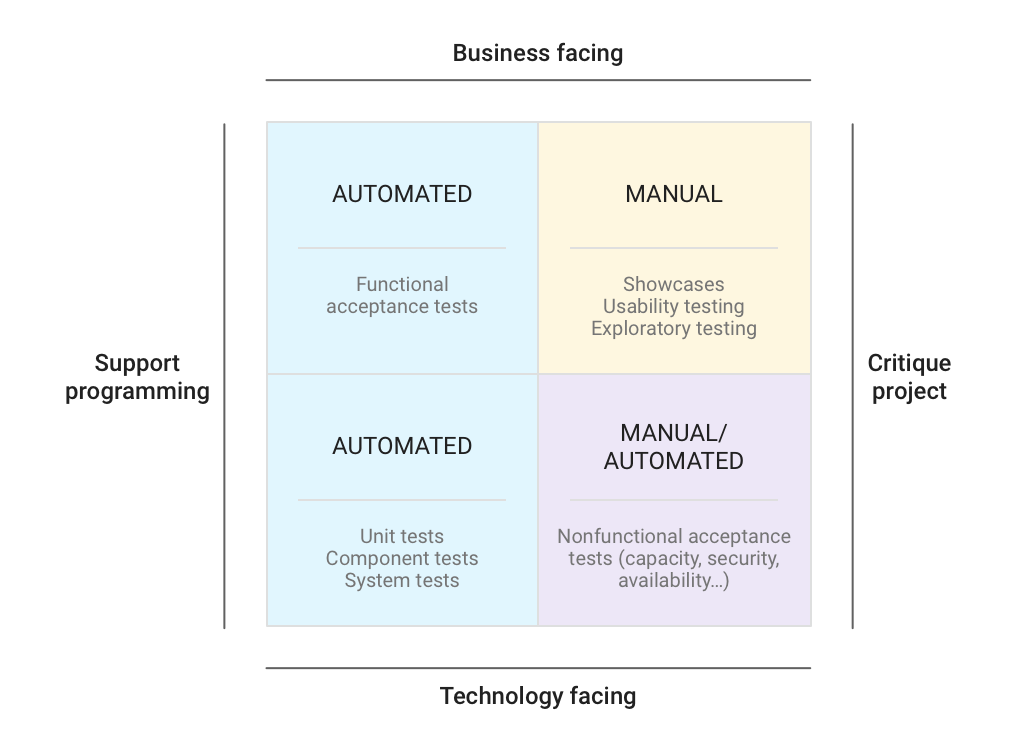
Testing is an art of its own because testing can cover from Unit test to User Acceptance test (UAT) and system performace testing (Availability, Load/Stress). In this lab, to get a taste of CI/CD, we fous on Unit Tests. Many programming languages have at least one unit test library.
# Automation Tools
In the developing process/life cycle, there are task that are consider to be routine work such as Testing and Deploying. For testing, once the test script is created, it is just a matter of executing it regularly and, in context of CI, as much as possible (the sooner the bug is detected, the better). For deploying, we could stick to the old copy the code and restart the service. Surely, deploying the app, especially web app, is mostly the same process every build. In term of CD, we want the deployment to be a convinence process. Automating deployment is what we are after (simply, a script that once run, the project is deployed).
Automation tool is a tool that runs the script you create (test script and deploy script are the examples). Instead of a person runs scripts, a system runs them. What great is they help to keep record of every build.
Let's explore the two well-known tools. Jenkins and GitHub Actions.
# Jenkins
www.jenkins.io (opens new window)
The leading open source automation server, Jenkins provides hundreds of plugins to support building, deploying and automating any project.
# GitHub Actions
docs.github.com/en/actions (opens new window)
Automate, customize, and execute your software development workflows right in your repository with GitHub Actions. You can discover, create, and share actions to perform any job you'd like, including CI/CD, and combine actions in a completely customized workflow.
The key difference between the two is automation server. Jenkins runs on your server but GitHub Actions runs on the Github environment. Therefore, GitHub Actions shares any privacy concern with other cloud/third-party services. In addition, any system related testing could be done directly with Jenkins (becuase it runs on your server).
The following table summarized the differences between Jenkins and GitHub Actions.

# What are we doing today
Our objective today is the get a taste of CI/CD. We will use Django as a base project and create a test script (Countinous Testing). Then, we will explore the GitHub Actions and try to achive CI (Continuous Integration). Last, we will use "workaround" of GitHub Actions to create Automate Deploy (Continuous Deploy).
Note that we do not achieve Continuous Delivery